


Money Eco: Budget / Expense
4.711.00 Reviews
App Specs
- Version
- 7.1.0
- Updated On
- License
- Free
- Downloads
- 10,000+
- Developer
- Apponance, Inc.
- Categories
- Finance
- Platform
- Android
Screenshots
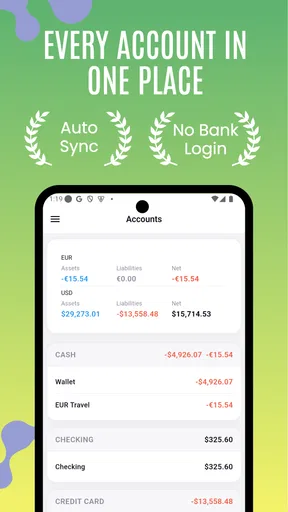
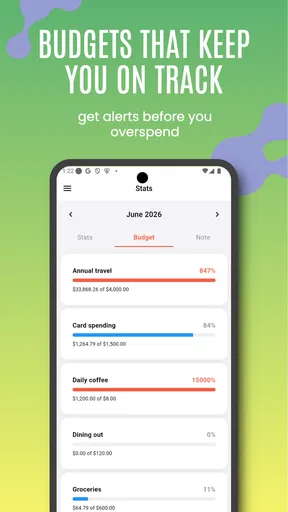
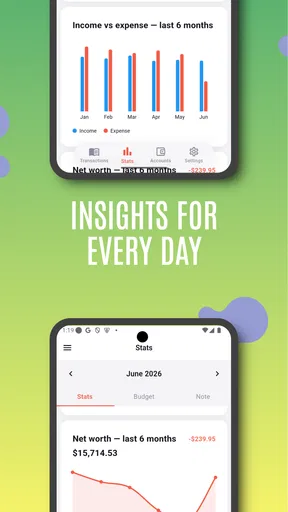
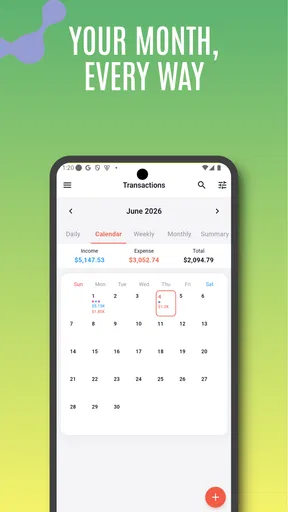
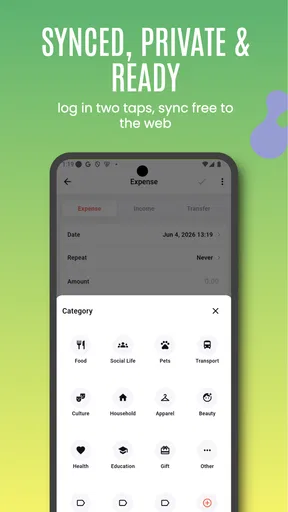
 Analysis by AppCompare
I approached Money Eco: Budget / Expense as a practical finance app rather than a complete banking replacement. Its purpose is straightforward: help me record spending, organize a personal budget, and turn everyday money activity into a visual report that is easier to understand. That focus makes it appealing when I want a calmer view of my finances without opening a full banking dashboard every time.
Developed by Apponance, Inc., this free finance app is aimed at general users and carries an Everyone age rating. It has reached over ten thousand installs and holds a 4.7 average from dozens of ratings, which suggests a small but notably positive user base. The app includes optional in-app purchases ranging from $0.99 to $14.99 per item, so I would treat the free experience as the starting point and check each purchase screen carefully before confirming anything.
How Money Eco handles everyday money tracking
I focus on Money Eco’s visual approach to tracking, because that is what gives the app its clearest purpose: it can help turn a collection of everyday spending decisions into a picture I can review. I’ll look at how that kind of summary can guide a practical check-in, and why a simple category plan matters before the reports become useful.
Readability and navigation that suit quick check-ins
The strongest part of the concept is its visual approach. Instead of forcing me to interpret a long stream of transactions, Money Eco is built around the relationship between income, expenses, budgets, and reports. That matters because finance information can become tiring when every detail is presented with equal importance. A useful visual summary lets me answer a simple question quickly: where is my money going?
I found this style especially useful for short check-ins. After buying groceries, paying for transport, or covering a recurring household expense, I can treat the app as a small record rather than a project that needs a dedicated hour. The value is not just in entering the amount; it is in building a history that can later reveal patterns I would probably miss in my bank statement.
For a person who prefers visual learning, charts and reports can be more approachable than a spreadsheet. They also make conversations about spending less abstract. If a monthly budget feels too high, seeing several categories grow during the same period can make the problem easier to identify. The most useful habit is to review the visual report after recording expenses, not merely to collect entries and forget them.
Navigation should be easiest for users who already understand the basic language of personal finance: income, expense, category, and budget. Someone new to budgeting may need a little patience before the difference between recording a purchase and setting a spending limit becomes natural. I would begin with only a few broad categories instead of trying to classify every small purchase perfectly from the first day.
Worth Reading Before You Choose

EA SPORTS FC Mobile 26 Is a Bigger Football Game, but It Takes Time

Flipboard Shows What News Apps Must Do Beyond the Feed

Switching to Android Auto Means Rethinking Your Driving Routine

Google Calendar Makes a Crowded Week Easier to Manage

Ludo King Makes the Most of the Minutes Between Plans

Baby Panda World Brings Quick Play to Modern Phones, but Its Game Library Feels Busy
The current version is 7.1.0, and that gives the app a more established feel than a brand-new experiment. Even so, I would not expect the same depth of workflow as a large banking platform. Money Eco is better understood as a focused companion for organizing financial information manually, especially when I want control over what I enter and how I view it.
Why visual reports help, and when they can overwhelm
Visualization is helpful only when it reduces mental effort. A clean summary can show whether dining, shopping, transport, or household costs are taking more room than expected. But a report can also become confusing if I create too many categories or enter inconsistent labels. For example, recording one coffee under “food” and another under “eating out” may make the final picture less useful.
My practical advice is to decide on a simple category system before using the app seriously. I would separate fixed commitments from flexible spending, then reserve a small number of categories for irregular costs. This approach makes the reports more stable and avoids the common trap of creating a new category whenever a purchase feels slightly different.
There is also a trade-off between detail and readability. Recording every small transaction can produce a more accurate picture, but it increases the effort required to maintain the habit. Recording only major expenses is easier, yet it can hide the small repeated purchases that quietly affect a budget. Money Eco works best when I choose a level of detail I can sustain for several weeks rather than aiming for perfect accounting on the first day.
Motor and sensory considerations during data entry
Finance tracking involves repeated tapping, typing, and reviewing. That makes motor comfort important even when an app appears simple. Entering an amount, choosing a category, and checking a report may be easy for one person but tiring for someone with limited dexterity, hand tremors, or difficulty with precise touch controls. I would test the entry flow with realistic transactions before committing to daily use.
A useful workaround is to prepare a short, consistent list of categories. Fewer choices mean fewer repeated taps and less visual searching. I would also record expenses in batches when possible, perhaps after returning from shopping, rather than trying to update the budget while walking, carrying bags, or dealing with a busy environment. That is not a special feature of the app, but it makes the workflow more manageable.
Users with visual sensitivities may appreciate the idea of reports more than dense tables, although visual information is not automatically accessible. Charts can be difficult when colors are too similar, labels are small, or meaning depends on color alone. I would not rely on a graphic without checking the accompanying figures or category names. For someone who needs large text, strong contrast, screen-reader support, or a specific color treatment, the actual experience may depend heavily on the phone’s operating-system settings and the app’s current interface.
That distinction is important: a visual finance app can improve comprehension for some people while creating extra work for others. I would recommend a short trial for anyone with low vision, color-vision differences, or sensitivity to crowded screens. If the reports are difficult to interpret without zooming or squinting, a simpler text-first budget tool may be a better choice.
Situational access: where it fits into real routines
Money Eco makes the most sense in situations where I want a personal record separate from my bank. Consider a shared household in which one person pays for groceries and another covers utilities. Each person can track their own spending and compare it with an agreed household plan, without needing to hand over full banking access. The app can support the conversation, while the people involved still decide how to divide responsibilities.
It can also help someone preparing for a move, a new job, or a change in monthly income. During those transitions, a visual record of current expenses can make it easier to distinguish essential commitments from costs that can be adjusted. I would use it for a few weeks before making major decisions, because a single unusual week rarely represents a normal budget.
Another useful workflow is an end-of-week review. I would record purchases during the week, then look at the report on a quiet evening. The goal would not be to criticize individual choices. Instead, I would ask whether the categories match my priorities and whether the budget reflects reality. If transport costs rise because of a temporary commute, the report can show that change more clearly than memory can.
The app may also suit people who do not want to connect financial accounts to a budgeting service. Manual entry takes more effort, but it offers a deliberate checkpoint before a purchase becomes part of the record. That can be valuable for users who are cautious about linking accounts or who simply prefer to keep financial tracking separate from their bank login.
On the other hand, manual tracking is a serious limitation for people with many transactions, multiple accounts, or irregular business expenses. If I need automatic synchronization, invoice management, tax records, shared permissions, or detailed forecasting, I would look toward a dedicated financial platform instead. Money Eco is more comfortable as a personal budgeting notebook with visual analysis than as an all-purpose financial command center.
How it compares with spreadsheets, banking apps, and other budget tools
A spreadsheet offers almost unlimited flexibility. I can design custom formulas, create unusual categories, and keep years of records in my own structure. That flexibility comes with setup and maintenance work. Money Eco is more appealing when I want a ready-made personal finance environment and do not want to build charts or formulas myself.
A banking app is usually better for checking balances, confirming transactions, and moving money. It may show spending automatically, but its reports are tied to the bank’s categories and presentation. Money Eco has a different role: it gives me a place to deliberately organize the information I consider important. The two can complement each other, though using both means I must be consistent when comparing totals.
Compared with a very simple notes app, Money Eco has a clearer budgeting purpose and a stronger emphasis on visualization. A notes app may be faster for writing “spent on lunch,” but it will not naturally turn a collection of notes into a useful spending picture. The trade-off is that Money Eco asks me to follow a more structured routine.
Compared with feature-heavy budgeting services, its focused nature can be a benefit for beginners. There are fewer financial concepts to learn at once, and the central task remains visible. The downside is that users expecting automatic account connections, advanced planning, or collaborative household controls may find the experience too limited. I would choose it for clarity and intentional tracking, not for maximum automation.
Remaining barriers and points to check before relying on it
The first barrier is consistency. No budgeting app can produce a trustworthy report if entries are skipped, duplicated, or placed in confusing categories. Manual tracking can be empowering, but it also creates responsibility. I would make a small routine around it, such as entering purchases after arriving home and checking the report on the same day each week.
The second barrier is the possibility of overinterpreting a visual summary. A clear chart can make a number feel authoritative even when the underlying entries are incomplete. I would compare important totals with bank records and receipts, particularly before making decisions about rent, debt, or long-term savings. The app should support judgment, not replace it.
The third issue is purchase awareness. The app is free to download, but optional items are available inside it, with prices from $0.99 to $14.99 per item. I would read the wording on any upgrade screen and confirm whether a purchase is genuinely useful for my routine. A paid option may be worthwhile for a regular user, but someone only testing the habit should first see whether the basic workflow fits.
There is also a privacy and access question that every manual finance app raises. I would avoid entering sensitive information that is not needed for budgeting, use a device lock, and think about who can access the phone. Keeping data separate from a bank account may reduce one kind of exposure, but it does not remove the need for sensible device security.
Finally, accessibility should be judged through direct use rather than assumptions. The Everyone rating tells me the app is intended for a broad audience, but it does not guarantee that every person will find the text, charts, controls, or data-entry process comfortable. Anyone relying on assistive technology should test the exact screens they use most, especially category selection and report interpretation.
Who will get the most from Money Eco?
I would recommend it to someone who wants a visual personal budget, is willing to enter expenses manually, and prefers a focused tool over a complicated financial suite. It is particularly suitable for a first budgeting experiment, a short-term spending reset, or a person who wants to understand habits without connecting a bank account to another service.
It can also work well for users who think in patterns rather than rows of figures. Seeing categories develop over time may make the budget feel more concrete. The app is less suitable for someone who dislikes manual entry, needs automatic updates, manages business finances, or expects a complete replacement for banking and accounting software.
For users with different abilities, I would describe it as potentially approachable but not universally effortless. The visual format may help people who struggle with dense financial text, while the same charts may challenge people who need strong text alternatives or have difficulty distinguishing visual elements. A short, honest trial is the right way to decide.
My inclusive verdict after using the budgeting approach
Money Eco succeeds when it keeps personal finance visible without turning it into a technical exercise. I like the emphasis on recording expenses, setting a budget, and reviewing the result as a connected process. The visual reports give the routine a purpose, and the focused design is less intimidating than a large financial platform.
I would not present it as a universal solution. Its usefulness depends on a willingness to maintain entries, and its visual presentation may not suit every sensory or accessibility need. Users who require automation, advanced financial controls, or highly customized reporting should choose a more specialized alternative. Those who want a simple, deliberate way to see their spending may find this app much more comfortable.
My final recommendation is to start with a small category structure, use it through a normal week rather than an unusually quiet period, and judge the reports by how clearly they guide your next decision. If that process feels manageable, the app can become a practical companion for everyday budgeting. If entering each transaction already feels like a burden, no attractive report will fully solve the problem. Its real strength is turning intentional tracking into an understandable visual routine.
Pros
- Simple interface makes tracking daily spending quick and approachable.
- Helpful budget categories make it easier to organize personal expenses.
- Useful summaries provide a clear view of spending habits over time.
- Manual entry can work well for users who prefer full control of their data.
- Suitable for basic household budgeting without unnecessary complexity.
Cons
- Manual transaction entry may become tedious for frequent purchases.
- Advanced planning tools may be limited compared with premium finance apps.
- Users may need to create and adjust categories to match their habits.
- Data accuracy depends on consistently recording every expense.
- Some features or conveniences may require in-app purchases or upgrades.
FAQs for Money Eco: Budget / Expense
What is Money Eco: Budget / Expense used for?
Money Eco: Budget / Expense is designed to help you organize personal finances by recording income, expenses, and spending categories in one place. After reviewing its main functions, it is best suited to users who want a clearer view of daily spending, monthly budgets, and saving progress without relying on complicated spreadsheets or advanced accounting software.
Is Money Eco: Budget / Expense suitable for beginners?
Yes, the app is generally approachable for beginners because its main purpose is straightforward: enter transactions, assign categories, and review your financial activity. New users may need a little time to create useful categories and establish a regular tracking habit, but the basic workflow is much easier to understand than a full-featured accounting platform.
Can Money Eco: Budget / Expense help me create and follow a budget?
The app can be useful for setting spending limits and monitoring whether your expenses remain within those limits. Its value depends on entering transactions consistently and choosing realistic categories. It is most effective when used as a daily or weekly money-management tool, rather than as an automatic solution that manages your finances without user input.
Does Money Eco: Budget / Expense protect my financial information?
Before entering sensitive financial details, users should review the app’s current privacy policy, permissions, and data-handling information on the official store listing. Budget apps may store information locally, synchronize it online, or use third-party services depending on their configuration. Avoid entering bank passwords, card PINs, or unnecessary confidential information unless the app clearly requires and protects it.
Is Money Eco: Budget / Expense free to download, and are there extra costs?
The availability of free features, advertisements, subscriptions, or optional purchases can vary by platform and may change after updates. Before downloading, check the Google Play Store or Apple App Store listing for the current pricing details. Also confirm whether important features such as reports, synchronization, backups, or unlimited categories are restricted to a paid version.


